
XTaskDialog v1.15 An
emulated version of Vista's Task Dialog APIs (Obsolete)
Welcome to XTaskDialog, an emulation of the Vista Task
Dialog APIs for down level operating systems including
Windows 98, Windows ME, Windows 2000,
Windows XP and Windows 2003.
Task Dialogs are designed as the replacement for the venerable MessageBox API
call. Some of you may know that I have extended the MessageBox API for MFC
clients thro the use of my CMessageBoxX class. You can do quite a few things with the message box API
but MS have decided in their wisdom to deprecate the API in preference to
the much more extensible Task Dialog API. For a good intro on the usage of Task
Dialogs check out Michael Dunn's article at
http://www.codeproject.com/vista/VGTaskDialog2.asp. There is also a good
article also on CodeProject about developing an emulated version of the API at
http://www.codeproject.com/useritems/taskdialogs.asp. XTaskDialog is my own
independently developed emulation version of the Task Dialog API. Note
that some of the XTaskDialog code which creates the in memory dialog template is
based in part on the XMessageBox class by Hans Dietrich at
http://www.codeproject.com/dialog/xmessagebox.asp . You should check this
article out as a good primer on how you go about creating in memory dialog
templates.
Here's an example of what a Task Dialog looks like from the sample app included in
the download assuming you want to see what pretty much all the features look
like, when it is run on Windows XP with theming enabled:
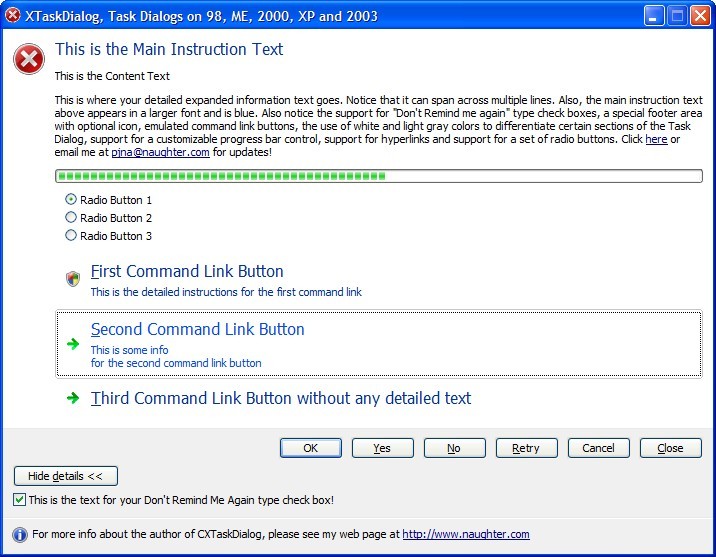
Please bear in mind that "less is more" when it comes to UI design and a well
written application should not try to use all of the features of a TaskDialog in
every single dialog which your application puts up!
Here is a list of the Features / Limitations of the code currently:
- Supports most of the Vista native Task Dialog functionality. This includes:
Main instruction text, content text standard command buttons, custom command
buttons, radio buttons, Verification check box, expanded text (and associated
dialog animations), customizing the expando button caption, standard task dialog
message box sounds, footer text, main icon and footer icon customization including
the Vista UAC shield icon, support for hyperlinks in text, a complete emulation
of command link buttons (These are the 3 options in the centre of the screen
capture above which include a larger caption and then a smaller more detailed
description on them), a progress control, callback timer support,
TDM_NAVIGATE_PAGE and TDN_NAVIGATED support and support
for a minimized task dialog.
- Having described the main features of task dialogs and what XTaskDialog
supports, here is a list of the current limitations of the XTaskDialog emulation
of TaskDialogIndirect:
- TDM_SET_PROGRESS_BAR_STATE is only supported on Windows Vista, so in reality
you will not be able to use "paused" or "error" progress bars on downlevel OS'es.
- TDM_SET_MARQUEE_PROGRESS_BAR / TDF_SHOW_MARQUEE_PROGRESS_BAR is only supported
for apps which are linked with a Common Control v6 manifest and running on Windows
XP or later.
- TDM_SET_BUTTON_ELEVATION_REQUIRED_STATE is only supported for command link
buttons and not for the standard buttons on the task dialog.
- TDF_ENABLE_HYPERLINKS is only supported for apps which are linked with a
v6 Common Control v6 manifest and are running on Windows XP or later. If you try to
create a task dialog if either of these conditions are not true, then the task
dialog will fail to show because it could not create the required "SysLink"
child windows. You have been warned!
- The metrics which XTaskDialog uses for calculating the dialog window width
is definitely different that the native Vista implementation. The mechanism
which XTaskDialog uses to calculate the width is quite complicated and for those
interested (or for those who spot problems with it), this logic is implemented
in CXTaskDialog::Layout.
- The expando button and its associated text is currently drawn using a
standard button rather than the bitmap button the native Vista version seems
to uses.
- The emulated command link buttons do not emulate all the nice UI / animation
features which the native Vista version implements. For example the emulation
does not do as nice a job as Vista to show a "selected" command link button.
That said the emulation is pretty good and unless you are a hard core UI developer
who is used to examining every pixel<gg>, you will most likely not notice much
difference.
- The native Vista implementation supports stacking of the standard buttons
when horizontal space is limited. Currently XTaskDialog does not support this.
- The native Vista implementation aligns the check box and expando buttons
vertically with the standard buttons. Currently XTaskDialog displays both of
these controls below the button row.
- The native Vista implementation supports scrolling in the Task Dialog if
any of the text is too big to fit on the current working area of the screen.
Currently XTaskDialog does not prevent this, so please make sure you fully
test with all the text you will be using in your client applications.
- TDF_RTL_LAYOUT is currently not properly supported by XTaskDialog. If you
think support for this would be useful, then I may implement this in a future
release.
- Quite a few of the various colors and metrics used by XTaskDialog are hard
coded. Examples include the colors used for the dialog backgrounds and divider
colors, the various colors used by the emulated command link buttons and the
color used for the main instruction text. I believe these will have to remain
hard-coded because downlevel OS'es simply would not support the required system
metrics to get these values even if I knew you could get these system metrics
on Vista!.
- The icons shown on the emulated command link buttons are vertically centred.
The native Vista implementation seems to use a fixed offset from the top.
- Because the code uses the _TrackMouseEvent function (used to implement
the hot look for the emulated command links) and the MultiMon function "MonitorFromWindow",
the code requires at least Windows 98 to operate correctly, that is it will
not work for Windows 95.
- Finally with all the limitations mentioned above, you can consider all the
other features of TaskDialogIndirect as fully emulated by XTaskDialog. For example,
all the animation effects which the native TaskDialogIndirect API uses for handling
the expando text are pretty faithfully emulated. If you think I have missed
something compared to the native Vista implementation, then please drop me an
email and I will see about including it in a future release.
The
enclosed
zip file contains the
XTaskDialog source code and a simple VC 2005 test program to exercise the classes
provided.
Copyright
- You are allowed to include the source code in
any product (commercial, shareware, freeware or otherwise) when your product
is released in binary form.
- You are allowed to modify the source code in
any way you want except you cannot modify the copyright details at the top
of each module.
- If you want to distribute source code with
your application, then you are only allowed to distribute versions released
by the author. This is to maintain a single distribution point for the
source code.
Updates
2 July 2017
- Please note that since XP has been out of support since April 2014 (and
Vista has been out of support since April 2017), there is no longer any need
for this code and as such is now considered obsolete. You should use the
built in MFC CTaskDialog class in your code.
V1.15 (29 September 2015)
- Updated the code to clean compile on VC 2013 & VC 2015.
- Updated the code to include the latest _TASKDIALOG_FLAGS enums from the
Windows SDK
- Updated the code to correctly handle High DPI settings.
- CXTaskDialog::AddItem now uses MulDiv to convert between pixels
and dialog template units
- Fixed a bug in CXTaskDialog::Layout in the positioning of the
footer icon
- CXTaskDialogMFCClient::DoModalNative and
CXTaskDialogMFCClient::DoModalEmulatedDLL are now virtual methods.
- Code no longer uses LoadLibrary without an absolute path in
CXTaskDialogMFCClient::DoModalEmulatedDLL. This avoids DLL planting security
issues.
V1.14 (28 September 2012)
- Refactored all string loading into LoadStringResources method.
- Refactored all icon loading into a new LoadIconResources method.
- XTaskDialog now provides support for TDM_NAVIGATE_PAGE and
TDN_NAVIGATED. Thanks to Jan-Hendrik Spieth for prompting me to add support
for this.
- Updated the code to clean compile on VC 2012.
V1.13 (16 May 2012)
- Updated copyright details.
- Fixed an issue in XTaskDialogDefines.h where it did not correctly set
structure packing layout correctly for TaskDialog structures when code is
built for x64. Thanks to Mihajlo Cvetanovic for reporting this issue.
- The demo app now only tries to demonstrate Hyperlink support in Unicode
builds of XTaskDialog on XP or later. This resolves an issue where the demo
app would not do show anything when either of the first two buttons were
clicked when on Windows 2000. This limitation is mentioned in the Features /
Limitations section of the XTaskDialog but it is nice to have the demo app
work out of the box on Windows 2000 unmodified. Thanks to Stéphane Perras
for reporting this issue.
- The supplied zip file now inclues a x86 ASCII version of XTaskDialog in
addition to the existing x86 Unicode and x64 Unicode version of the dll.
- XTaskDialog now uses the MONITORINFO::rcWork rect instead of
MONITORINFO::rcMonitor when determing the max width of the TaskDialog
window.
- Fixed a bug in CXTaskDialog::HandleExpando where the m_nExpandedTextID
control was not being correctly shown when client area animations are turned
off.
- Fixed a bug in CXTaskDialog::OnTimer where the final vertical height of
the dialog was not exactly correct when handling expando text
- Fixed a bug in CXTaskDialog::HandleExpando where the code did not handle
reentrancy if the animation timer was already active.
V1.12 (19 December 2010)
- Updated copyright details.
- Updated the code to compile cleanly on VC 2010
- Fixed an issue in CXTaskDialog::Layout where a default OK button would
not get created in some scenarios. The code has been updated to behave more
like the Windows API does. Thanks to "Jan-Hendrik" for reporting this issue.
V1.11 (17 December 2009)
-
Fixed an issue where if the XTaskDialog code was included in a project
which uses parts of the MFC Feature Pack classes which were integrated in
the MFC version shipped with Visual Studio 2008 SP1, you would get a number
of compile errors. This is because MFC now has its own class named CDialogImpl in addition to the standard ATL class of the same name. The
XTaskDialog code now explicitly uses the ATL namespace to address this
issue. Thanks to Nordlund Jonas for reporting this issue.
V1.10 (14 October 2009)
-
Fix for returning the correct ID of the button which closes the task
dialog if it is closed via the default button via the RETURN key. Thanks to
Mathias Svensson for reporting this bug.
V1.09 (28 June 2009)
-
Updated the sample apps project settings to more modern default values.
-
The supplied zip file now inclues a x64 Unicode DLL version of
XTaskDialog built with VC 2008.
-
Fixed a bug in calling SystemParametersInfo(SPI_GETNONCLIENTMETRICS,...
). The issue is that the NONCLIENTMETRICS structure can be bigger depending
on the value of the WINVER preprocessor value. The code now ensures that the
original base size of NONCLIENTMETRICS is used to ensure it works on down
level operating systems. For more information on this issue, please see the
MSDN documentation on the NONCLIENTMETRICS stucture. Also the second
parameter to SystemParametersInfo in the code was incorrectly being set to
0, it is now set to the sizeof the structure. Thanks to Dick Smith for
reporting this issue.
-
Updated the code to be as independent as possible from the standard
Windows preprocessor variables (WINVER, _WIN32_WINNT, _WIN32_WINDOWS &
_WIN32_IE). Note the code still requires WINVER >= 0x500
V1.08 (20 January 2009)
- Updated copyright details.
- Fixed the text reported in a number of ATLTRACE calls throughout the
code
- Fixed a bug where the dialog would appear with a top horizontal white
block, followed by a grey block, then a separator and then a final grey
block even when no non command link buttons are displayed on the grey
blocks. When this condition now occurs, the whole dialog is now shown in
white. This is consistent with how the native TaskDialog API behaves on
Vista. Thanks to Jacob Liebeck for reporting this bug.
V1.07 (12 October 2008)
- Updated copyright details
- The code has now been updated to support VC 2005 or later only.
- Updated code to compile correctly using _ATL_CSTRING_EXPLICIT_CONSTRUCTORS
define
- Updated code to clean compile on VC 2008
- Code now compiles cleanly using Code Analysis (/analyze)
V1.06 (5 April 2007)
- Fixed a bug where the code would not correctly set the initial selection
state of the radio buttons in CXTaskDialog::OnInitDialog. Thanks to
Demetrios A. Thomakos for reporting this bug.
V1.05 (31 March 2007)
- Removed use of internal "VerificalTextSpacing" enum value.
V1.04 (30 March 2007)
- Fixed a problem where the progress control was not created with the
proper width if the end of the button row was to the left of the left of the
control text. Thanks to Demetrios A. Thomakos for reporting this bug.
- Fixed a bug where the main instruction text could sometimes appear in a
standard sized font instead of the expected larger size. Thanks to Demetrios
A. Thomakos for reporting this bug.
- Fixed a bug where all static text controls could sometimes display
clipped text. Thanks to Demetrios A. Thomakos for reporting this bug.
V1.03 (22 March 2007)
- TaskDialog function exported from XTaskDlg dll now uses the correct
definition for the TaskDialog API as described on the MSDN pages.
It seems that the description of the TaskDialog as provided with the latest
Vista SDK (aka Windows SDK) is incorrect and forget to mention the
pszContent parameter. Thanks to Demetrios A. Thomakos for reporting this
issue.
- Removed an unused "m_bCancelButtonPresent" member variable from the
CXTaskDialog class.
- Fixed bug where cancel button would always be ignored when clicked when
you did not provide the TDF_ALLOW_DIALOG_CANCELLATION flag.
V1.02 (20 March 2007)
- Fixed a bug where the code unnecessarily set the progress bar range to
0-100 in CXTaskDialog::OnInitDialog. This was causing client calls to
TDM_SET_PROGRESS_BAR_RANGE in TDN_CREATED notifications to effectively be
ignored. Thanks to Demetrios A. Thomakos for reporting this issue.
- For completeness, the DLL version of XTaskDialog now also emulates the
TaskDialog API call in addition to the existing TaskDialogIndirect API call.
Thanks to Demetrios A. Thomakos for reporting this issue.
- XTaskDialog now ships with its own version of the error, warning and
info icons in addition to the existing shield icon. This now allows
XTaskDialog to work out of the box on Windows 98 and Windows ME in addition
to 2000, XP and 2003 which were already supported. In addition the icons are
a closer match for the Vista icons. For example the TD_INFORMATION_ICON icon
is a I on a blue background.
- Fixed a typo and a minor code optimization in
CXTaskDialogCommandLink::DrawItem.
- CXTaskDialogCommandLink now provides a WM_ERASEBKGND handler to optimize
it drawing
- Minor code optimization in CXTaskDialog::CalculateCommandLinkMetrics.
- CXTaskDialog::LoadStringResource method has been renamed to
LoadStringResources.
- Fixed a minor vertical layout issue for TDF_EXPAND_FOOTER_AREA footer
text in CXTaskDialog::Layout
V1.01 (16 March 2007)
- Updated XTaskDialogDefines.h so that XTaskDialog can be used in VC 6
without the need for the Platform SDK header files to be integrated with VC
6. Thanks to Andre Buenger for reporting this issue.
- I've done some testing of the code on Windows 9x (specifically Windows
ME). As well as the restrictions which I have already documented,
XTaskDialog will fail to show if you use TD_WARNING_ICON, TD_ERROR_ICON or
TD_INFORMATION_ICON for the main icon or the footer icon. The reason why
this fails is that the XTaskDialog code expects these icons to reside in
user32.dll, but on Windows 9x which is a mixture of 16/32 bit binaries,
these icons do not exist. I could fix this issue by adding in my own
versions of these icons, but to be honest this is too much effort for such
old operating systems. Instead, If you specify your own icons for the main
icon or the footer icon, then XTaskDialog will display correctly. Hopefully
for those people still supporting Windows 9x apps out there, this will be
another reason to use XTaskDialog to spruce up your application. Thanks to
Andre Buenger for reporting this issue.
V1.0 (14 March 2007)