
Welcome to CToasterWnd, an MFC class which provides a UI control
similar to the MSN Messenger style notification window aka a "Toast" window,
since it pops up!. It is based in part on a C# implementation of a similar type
window by Robert Misiak on CodeProject
Features
- Standard MFC class, which derives from CFrameWnd.
- Provides for title text, body text and an icon in the toast window (CToasterWnd::m_sTitle,
CToasterWnd::m_sText, CToasterWnd::m_TitleIcon).
- A close button is provided which takes advantage of Windows Themes.
(CToasterWnd::m_bUseThemingForCloseButton).
- Fonts used for the title and body text are customizable (CToasterWnd::m_fontTitle
and CToasterWnd::m_fontText).
- Colors for the title text and body text are customizable (CToasterWnd::m_colorTitle
and CToasterWnd::m_colorText).
- The layout of the title text and body text are customizable (CToasterWnd::m_dwTitleStyle
and CToasterWnd::m_dwTextStyle). This allows the text to be aligned, centred,
ellipsis replacement etc.
- The background color of the window is customizable (CToasterWnd::m_colorBackground).
- The control supports horizontal, vertical, and diagonal background styles,
in addition to a plain solid background. This is achieved using the GDI function
GradientFill. (CToasterWnd::m_colorGradient and CToasterWnd::m_BackgroundStyle).
- The time, which the window stays visible before it closes, is customizable.
(CToasterWnd::m_dwWaitTime).
- Whether or not the window closes based on an animation or only upon user
control is customizable (CToasterWnd::m_bOnlyCloseOnUser).
- The size of the window is customizable (CToasterWnd::m_nHeight and CToasterWnd::m_nWidth).
- Whether the window stays visible when the mouse stays over the control is
customizable. (CToasterWnd::m_bWaitOnMouseOver).
- The control supports 4 different types of animations when opening and closing.
These are popping up, popping down, popping to the left and popping to the right.
(CToasterWnd::m_AnimationStyle).
- The control supports customizing the position where the window is show.
This includes the 4 corners of the primary display. In addition it supports
a mode whereby it detects the most appropriate location based on the position
of the taskbar. (CToasterWnd::m_PopupPosition).
- The animation type also supports a mode whereby it detects the most appropriate
type based on the position of the taskbar.
- The control supports spacing from the edge of the screen work area, which
is used to calculate the popup position (CToasterWnd::m_nCXAreaEdge and m_nCYAreaEdge).
- Notifications for various events can be delivered to an external class (CToasterWnd::m_pNotifier).
The sample program uses this to do a simple message beep when the popup is shown.
- The icon, title and body text can be clickable. When the mouse moves over
these hot areas a hand cursor is shown.
- The window optionally supports a transparency animation effect (CToasterWnd::m_bTransparent).
- The classes are fully Unicode compliant and include Unicode built options
in the workspace file.
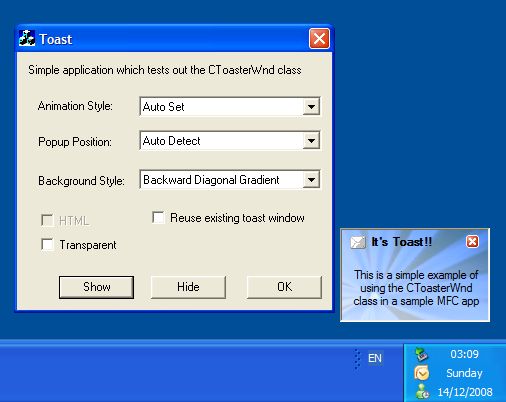
- A sample program is included which exercises most of the functionality.
- Since the class is a standard MFC class, you can derive you own class from
it to customize its drawing and/or behaviour. In addition the code is modular
and provides numerous virtual functions for customization. For example it would
not be much work to extend the class to support stacking of multiple toast windows.
- Optionally supports HTML in the window via the HTML control provided
at http://sciter.com
(CToasterWnd::m_bHTML).
- Supports including an alpha blended image in the client area of the control
(CToasterWnd::m_Logo, m_rectLogoSrc, m_rectLogoDest & m_nLogoSrcAlpha).
The enclosed zip file contains the classes
source code and a simple test app to exercise the class.
Copyright
- You are allowed to include the source code in any product (commercial, shareware,
freeware or otherwise) when your product is released in binary form.
- You are allowed to modify the source code in any way you want except you
cannot modify the copyright details at the top of each module.
- If you want to distribute source code with your application, then you are
only allowed to distribute versions released by the author. This is to maintain
a single distribution point for the source code.
Updates
v1.26 (15 February 2025)
- Updated copyright details.
- Updated sample app to use std::filesystem::path.
v1.25 (22 March 2022)
- Updated copyright details.
- Updated the code to use C++ uniform initialization for all variable
declarations.
v1.24 (29 March 2020)
- Updated copyright details.
- Fixed more Clang-Tidy static code analysis warnings in the code.
v1.23 (27 December 2019)
- Fixed various Clang-Tidy static code analysis warnings in the code.
v1.22 (30 September 2019)
- Fixed a number of compiler warnings when the code is compiled with VS
2019 Preview
v1.21 (2 June 2019)
- Updated copyright details.
- Updated the code to clean compile on VC 2019
v1.20 (4 August 2018)
- Updated copyright details.
- Fixed a number of C++ core guidelines compiler warnings. These changes
mean that the code will now only compile on VC 2017 or later.
- Replaced enum with enum class throughout the codebase.
v1.19 (28 October 2017)
- Updated copyright details.
- Replaced NULL with nullptr throughout the codebase. This means that the
code now requires VC 2010 at a minimum to compile.
- Added SAL annotations to all the code.
- Removed the code which used function pointers when calling the theming
APIs.
- Removed QHTM support code from the codebase as that control is no longer
available.
- Updated the code to support sciter (http://sciter.com)
instead of the older HTMLayout for HTML toasts.
- Made the CToasterNotification interface part of the CToasterWnd
class.
- Replaced BOOL throughout the codebase with bool.
v1.18 (26 July 2015)
- Updated copyright details
- Updated the code to clean compile on VC 2013 & 2015
v1.17 (25 August 2013)
- Updated copyright details
- Code now uses CDC::GradientFill instead of using function pointers directly.
- Code now uses CWnd::SetLayeredWindowAttributes instead of using function
pointer directly.
- Code no longer uses LoadLibrary without an absolute path when loading UxTheme.
This avoids DLL planting security issues.
- Demo app now includes a check box for enabling / disabling the background
image.
- The class now includes support for a new "m_bOnlyCloseOnUser" boolean setting.
This specifies whether the notification window can only be closed based on user
action i.e. not auto close because of an animation.
- Fixed a bug where window would not be drawn correctly when using the HTMLayout
control due to the OnPaint method being incorrect.
- The default value for "m_AnimationStyle" is set based on the value returned
from SystemParametersInfo(SPI_GETANIMATION.
v1.16 (14 December 2008)
- The control now supports drawing an alpha blended image in its client area.
This is achieved using the new member variables: m_Logo, m_rectLogoSrc, m_rectLogoDest
and m_nLogoSrcAlpha. The code internally uses the CImage class and its support
for alpha blending via the Win32 API function AlphaBlend. To use this functionality
in the control you must define the preprocessor variable WINVER to be >= 500.
Thanks to "Sky" for prompting this update.
v1.15 (10 December 2008)
- The timer interval used for the opening and closing animation is now controllable
via a member variable
- The size of the pixels in which to increase or decrease the window size
during the animation can now be controlled via a member variable
- Fixed a bug where the window could end completely transparent after the
initial opening animation
- Fixed a bug where the final size of the window could end up incorrect
- The control now uses double buffered drawing to help eliminate flickering
when the opening and closing animation is happening. Thanks to "sky" for prompting
this update.
v1.14 (17 August 2008)
- Fixed a bug where if the calculated body text height was larger than the
allowable window size, you previously got the title text intersecting with the
title text. Thanks to Steven Dwyer for reporting this issue.
- Changed the default DrawText formatting flags for the body text to DT_NOPREFIX
| DT_CENTER | DT_WORDBREAK | DT_EDITCONTROL. This is a better default value
for the typical body text
- Changed the default DrawText formatting flags for the title text to DT_NOPREFIX
| DT_LEFT | DT_SINGLELINE | DT_END_ELLIPSIS. This is a better default value
for the typical title text
v1.13 (13 July 2008)
- Updated copyright details.
- Updated sample app to clean compile on VC 2008
- The code has now been updated to support VC 2005 or later only.
- Code now compiles cleanly using Code Analysis (/analyze)
- Removed VC 6 style AppWizard comments from the code.
v1.12 (20 August 2007)
- Removed an unnecessary ASSERT in CToasterWnd::Popup.
- Internal animation state variable is reset in Close(), OnDestroy(), and
HandleClosing methods.
- Updated the sample app to show how you can reuse a CToasterWnd window if
you so desire. Thanks to Itamar Syn-Hershko for suggesting this update.
v1.11 (21 July 2007)
- Updated usage instructions about Platform SDK.
- The CToasterNotification notifier interface has been extended to support
a "OnHTMLayoutLoadData" method. This allows client code to customize the loading
of data when using the HTMLayout control without the need to implement a derived
class of CToasterWnd. Thanks to Itamar Syn-Hershko for reporting this suggestion.
- OnHTMLLayoutHyperLink method in CToasterNotification has been renamed to
OnHTMLayoutHyperLink
- OnHTMLLayoutCommand method in CToasterNotification has been renamed to OnHTMLayoutCommand
v1.10 (1 April 2007)
- Fixed a bug in the LoadHTML and LoadUrl methods where they were incorrectly
using the main window handle of the toaster window instead of the window handle
of the HTMLayout child control. Thanks to Itamar Syn-Hershko for reporting this
bug.
v1.09 (31 March 2007)
- The existing CToasterWnd::Show method has been internally refactored into
a Create method and Popup method. This allows client code to perform any custom
initialization on the control prior to it actually being shown to the end user.
Thanks to Itamar Syn-Hershko for prompting this suggestion.
v1.08 (17 March 2007)
- Updated copyright details.
- Removed the automatic inclusion of the various HTMLayout behaviors header
files. This avoids causing potential linking errors in client apps, since the
behavior objects are declared statically twice. Note that if you want to support
HTMLayout behaviors, then it is the responsibility of client apps to pull in
the required HTMLayout header files. Thanks to Itamar Syn-Hershko for reporting
this problem.
- Addition of 2 simple LoadHTML and LoadUrl helper methods to allow the toaster
window to easily be populated with HTML when using the HTMLayout control. Thanks
to Itamar Syn-Hershko for this nice addition.
- Addition of a m_dwHTML and m_pbHTML member variables when you are using
the HTMLayout control. If you populate these values, then the HTML for the control
will be taken from these variables instead of from "m_sText". Again thanks to
Itamar Syn-Hershko for this nice addition.
v1.07 (14 December 2006)
- Code now uses class name constant for QHTML control
- Updated sample app code to clean compile on VC 2005
- Macro to control inclusion of QHTM is now "CTOASTERWND_QHTM_SUPPORT"
- Control now allows you to use the HTMLayout control for HTML support for
the toast window. For more information about HTMLayout, please see
http://www.terrainformatica.com/htmlayout/
v1.06 (8 July 2006)
- Code now uses newer C++ style casts instead of C style casts.
- Updated the code to clean compile on VC 2005
- Close button is now shown hot only when the cursor is within its bounding
rect.
- Reworked the notification API somewhat. If you are using notifications,
then you should review the new layout of the CToasterNotification class.
- Class now allows you to put HTML text into the toast window. This is provided
by the QHTM HTML control provided at
http://www.gipsysoft.com/qhtm/.
You may need to purchase a license (depending on the type of application you
are developing) as well as follow their
instructions on deploying it if
you want this functionality with CToasterWnd. This functionality by default
is not included in CToasterWnd and is only available when you define the preprocessor
macro "CTOASTERWND_HTML_SUPPORT".
- Included support for a new "NoAnimation" animation style.
v1.05 (12 May 2006)
- Fixed a minor bug in CToasterWnd::Construct where function pointers were
not been checked correctly. Thanks to Wes Aday for reporting this issue.
- Fixed a bug in CToasterWnd::OnEraseBkgnd where the vertex values were not
being set correctly for the BackgroundDiagonalGradient and ForwardDiagonalGradient
styles. Again thanks to Wes Aday for reporting this bug.
v1.04 (11 February 2006)
- Updated the documentation to use the same style as the web site. Also did
a spell check of the document.
- Updated the documentation to refer to the need for the Platform SDK if you
are compiling the code using VC 6.
- Fixed a number of compiler warnings when the code is compiled using /Wp64.
- Update the copyright details.
v1.03 (25 April 2005)
- Now supports a new transparency animation effect (if on Win2k or later),
via a new m_bTransparent member variable. Thanks to Remio for this really cool
addition.
v1.02 (24 April 2005)
- Code now uses SHAppBarMessage to determine the task bar location.
- popup window is now by default offset horizontally as well as vertically
by a scrollbar
v1.01 (23 April 2005)
- Fixed some spelling typos in the documentation.
- Fix for image link on the download page.
- Title and body text can now be optionally made hot or not.
- Icon can now be hot.
v1.0 (22 April 2005)