
 TClock
v1.32 A Clock application which speaks the time to you
(Obsolete)
TClock
v1.32 A Clock application which speaks the time to you
(Obsolete)
This simple application sits in the tray notification area under Windows 95/98
and NT 4 and periodically speaks the current time of day.
Even with the time of day being displayed in the tray as standard under the Windows
95 shell, I often find that I lose track of time while testing the programs I produce.
I developed this program in response to this for myself. After I had finished developing
it, I thought that it turned out so well that other people might also find it useful.
The program allows a number of options to be tweaked including how often to say
the time and what voice to use. The following dialog is used:
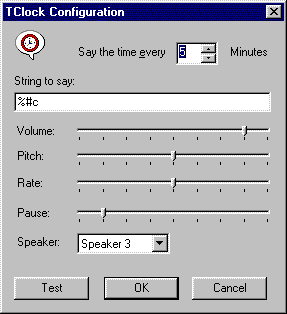
Full installation instructions for TClock are included in the
enclosed zip file which contains the TClock executables.
You will also need to download this zip file which
contains the text to speech engine I use. The speech engine is a large download
(Just under 2 MB), so be warned.
Updates
30 September 2012
- Please note that I have not worked on this application in many years and
is considered obsolete. Microsoft provides a Text To Speech SDK in recent versions
of Windows and it is very easy to implement something equivalent to TClock using
even just script.
v1.32 (5 September 2000)
- Optimized the reading of registry values. The values are now read at startup
only instead of periodically. This helps improve performance especially when
the program is running all the time.
- Speech options are now changed once the Test button is used in the configure
dialog.
- Hyperlinks in the about dialog are now functional again.
v1.31 (10 November 1998)
- Added a command line option /exit to the program. When this is supplied
the program will speak the current time immediately and then exit. This allows
the program to be called externally e.g. from an scheduling program such as
Task Scheduler in IE 4.
- Fixed problem where tray icon was appearing blurred.
v1.3 (9 June 1998)
- Fixed a problem relating to TClock not closing correctly if you happened
to close it while text was been spoken.
- Fixed possible crash with overruns on an internal buffer used during speaking
the time.
- Fixed problems with incorrectly reported the localtime when daylight savings
is in effect. Thanks to Stephen Charchuk for discovering this problem.
- Now includes a program ‘tpath.exe’ which adds an ‘App Path’
to the registry to allow TClock to be run without a fully qualified path. This
also means that you no longer need to add the LHSP directory to the path to
get the speech support working.
- Fixed a number of typos and invalid hyperlinks in the help file.
- TClock is now compiled with Visual C++ 5.
- TClock help file now includes a Contents ‘.CNT’ file.