
COSMCtrl v1.37 An MFC class to support
display of OpenStreetMap tiles
Welcome to COSMCtrl, A freeware MFC GUI control class which implements display
of OpenStreetMap tiles.
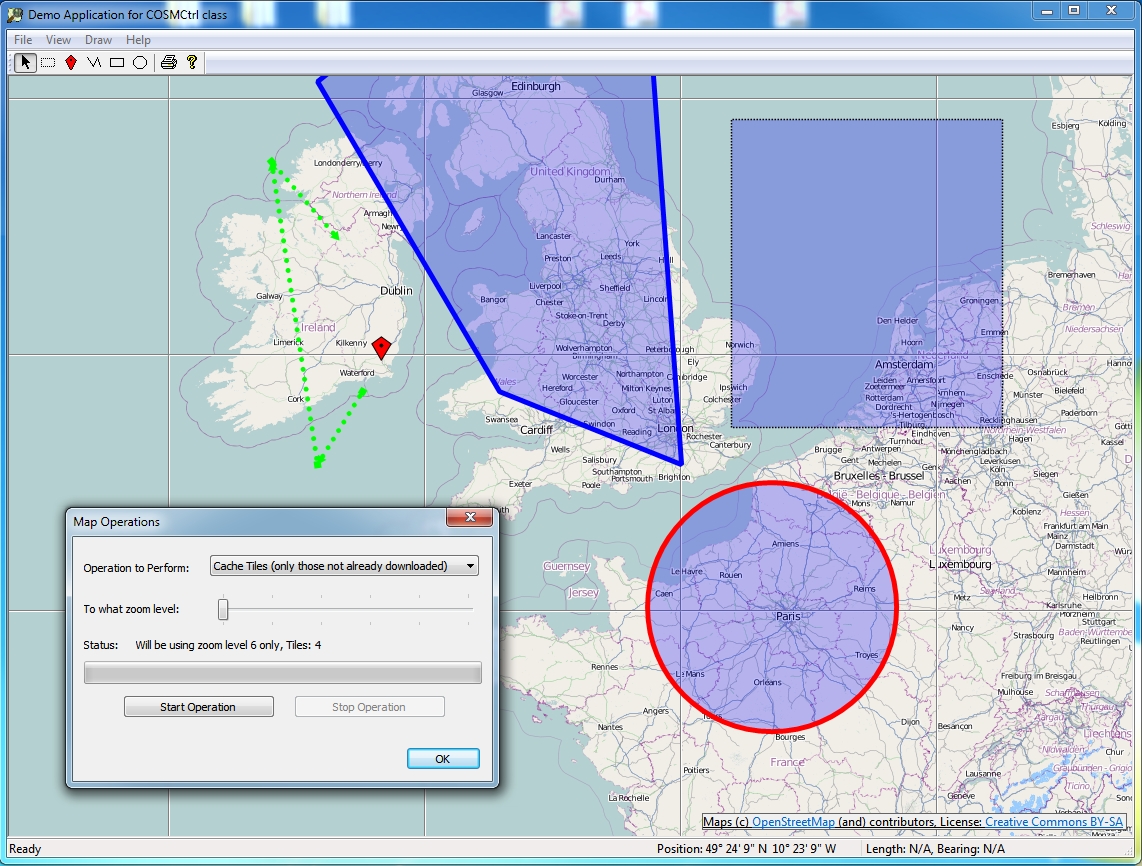
Here's a screen capture of the sample app provided in the download which exercises
the class:
Features
- Provides a standard MFC CStatic derived class which can be used just like
the CStatic class.
- Supports Mapnik, Cyclemap, Mapquest OSM and Mapquest Open Aerial tile providers.
- Supports downloading via WinHTTP to a configurable local file system cache
to improve performance.
- Supports zooming via keyboard keys and the wheel mouse. It uses the keys
'+' and '-' and a mouse left double click.
- Supports scrolling via the keyboard as well as mouse dragging. It uses the
keys "Left", "Back", "Right", "End", "Up", "Prior", "Down"
and "Next".
- Implements asynchronous download of visible tiles.
- Supports a scroll rose and zoom bar based on the same controls on the OpenStreeMap
web site.
- Supports displaying a simple legend which indicates scale.
- Supports automatically displaying correct OpenStreetMap copyright attribution
on the control. This is achieved through the use of a child control SysLink
control with hyperlinks to the OpenStreetMap web site and the license it uses.
- All of the control parts which the COSMCtrl class supports namely scroll
rose, zoom bar, legend and the copyright items can be attached to specific client
locations on the map.
- Tiles from the previous and next zoom level can be used in a stretched and
squeezed fashion if not available at the current zoom level.
- Supports used defined markers, polylines, polygons and circles being overlaid
on the map. In addition to just allowing static markers, polylines, polygons
and circles to be added, the code has comprehensive support for interactively
editing, dragging, moving and deleted these items. Please note that these items
cannot be correctly displayed if they cross the international date line or if
they traverse extreme polar latitudes which the slippy map tiles of OpenStreetMap
do not cover.
- Tiles outside the visible edge can be pre-cached for improved performance.
- Provides helper methods to allow download of specific tiles.
- Supports a full set of methods to calculate the distance between two points
as well as calculate the end location from a start position given a certain
distance and bearing. These methods implement C++ versions of Vincenty's Direct
and Inverse algorithms. These methods are required for calculation of the scale
bar as well as supporting dragging polygons and polylines. The sample app now
uses these features to show the distance and bearing for the first polyline
or polygon which is selected in the status bar.
- The class supports a Rectangular selection mode. When this mode is activated,
you can select specific markers, polylines and polygons on the map and in conjunction
with support for the "Delete" button you can interactively edit the
items on the map
- A complete sample app which exercises all the classes functionality including
print preview and printing support.
- Supports a comprehensive "Map Operations" dialog. This in conjunction
with the rectangular selection mechanism allows you to delete specific tiles,
download specific tiles (optionally skipping files which have already been downloaded)
as well as support Mapnik re-render requests. This dialog uses a worker thread
to remain responsive while these potentially lengthy operations are taking place.
In addition this dialog provides feedback via a progress control and a static
text notification area as the operation is taking place as well as cancelation
support. This dialog on its own provides a good example on how to implement
a responsive user interface while a lengthy operation is happening.
- Supports "decimation" of polylines and polygons. This feature
adds new nodes between all the existing nodes of a polyline or polygon. This
can prove useful where you have a feature where the curvature of the earth can
cause distortion of the displayed object. By default this feature is provided
for by double clicking on an editable polyline or polygon.
- Support for drawing crosshairs at the center of the map.
- Supports a ZoomToBounds method. This method takes two positions which the
method will ensure will be shown on the map at the highest possible zoom level.
In conjunction with various "GetBoundingRect*" methods you can now
add your various items to the map and then zoom to those items. This avoids
client code needing to explicitly handle zoom levels of center positions.
- Provides a comprehensive API via the public methods of the class. In addition
numerous virtual functions are provided to further customize the behaviour of
the class.
- Provides support for GPS devices via the authors
GPSCom2 library.
- As of v1.10, the sample app now supports collecting track logs to GPX files
and importing GPX files for display on the map.
- As of v1.12, the sample app now supports Nominatim Search and reverse geocoding
via the authors CNominatim
library.
- As of v1.14, the sample app now includes support for using GPS devices which
support the Windows 7 Sensors API in addition to the author's own
GPSCom2 library. This functionality
is provided using the author's
MfcSensor library.
- As of v1.15, the control now supports drawing with Direct2D as well as the
older GDI+ graphics API. This new code provides a very good sample to developers
who are looking to migrate their large GDI/GDI+ code bases to D2D as the before
and after code in COSMCtrl can be compared to each other.
- As of v1.20, the control now supports a "m_fBearingOfTopOfMap"
setting when using the D2D code path. This feature allows you to change the
map orientation so that north is not necessarily at the top of the map.
The enclosed zip file contains the COSMCtrl
source code and a simple VC 2017 MFC SDI Document View test program to exercise
all of the class's functionality.
Copyright
- You are allowed to include the source code in any product (commercial, shareware,
freeware or otherwise) when your product is released in binary form.
- You are allowed to modify the source code in any way you want except you
cannot modify the copyright details at the top of each module.
- If you want to distribute source code with your application, then you are
only allowed to distribute versions released by the author. This is to maintain
a single distribution point for the source code.
Updates
v1.37 (26 August 2022)
- Updated copyright details.
- Updated the code to use C++ uniform initialization for all variable
declarations.
v1.36 (30 December 2021)
- Reworked the GPX loading and saving code to use ATL::CComPtr instead of
#import.
- Fixed more Clang-Tidy static code analysis warnings in the code.
v1.35 (19 June 2020)
- Extended the CGPX::Save method to allow the GPX "creator" value to be
customized.
- Added support to the demo application to exporting to a GPX file.
Thanks to Ralf Wirtz for providing this nice addition.
- Fixed a bug in CGPX::Save which was creating invalid GPX files.
Thanks to Ralf Wirtz for reporting this issue.
- Optimized the code to not attempt to restart downloading tiles while
dragging the map or dragging on the zoombar.
v1.34 (5 June 2020)
- Fixed some general performance problems when downloading tiles
v1.33 (1 June 2020)
- Fixed a problem where zooming would not work in COSMCtrl::OnMouseWheel
when the current zoom level was a non-integer.
- Fixed a problem where zooming would not work in
COSMCtrl::HandleLButtonDownStandard when the zoom level was a non-integer.
- Replaced the Windows 7 Animation API's with good old WM_TIMER logic.
This improves the reliability of the animation logic in the control.
v1.32 (30 May 2020)
- Updated copyright details.
- Fixed Clang-Tidy static code analysis warnings in the code.
- Made more COSMCtrl methods virtual.
- Removed call to virtual SetTileProvider method in COSMCtrl constructor.
- Improved the D2D codepath to recreate D2D resources.
- Fixed a bug in COSMCtrl::DeleteSelectedItems when deleting a circle.
- Replaced COSMCtrlCachedTileEquivalent functor with a lambda in
COSMCtrl::GetCachedBitmap.
- COSMCtrl::PerformTileCacheMaintenance now uses erase-remove idiom
to improve performance.
- D2D codepath now implements a tile cache on the GPU just like the
GDI+ code path.
- The default size of the tile cache has now been increased to
1000.
- Move the drawing code for circles, markers, polygons & polylines
into virtual methods in the respective classes instead of the
COSMCtrl class.
- The "m_SelectionPolygon" member variable has been made a
std::unique_ptr<COSMCtrlPolygon> to allow easier end-user customization.
Also added a new CreateSelectionPolygon method to customize the creation of
the selection rectangle.
- The "m_Markers" array is now an array of std::shared_ptr<COSMCtrlMarker>
to allow easier end-user customization.
- The "m_Polygons" array is now an array of
std::shared_ptr<COSMCtrlPolygon> to allow easier end-user customization.
- The "m_Polylines" array is now an array of
std::shared_ptr<COSMCtrlPolygon> to allow easier end-user customization.
- The "m_Circles" array is now an array of std::shared_ptr<COSMCtrlCircle>
to allow easier end-user customization.
- The "m_GPSTrack" member variable has been made a
std::unique_ptr<COSMCtrlPolyline> to allow easier end-user customization.
Also added a new CreateGPSTrack method to customize the creation of the
selection rectangle.
- Changed the default animation time to 500 ms.
v1.31 (13 October 2019)
- Fixed a number of compiler warnings when the code is compiled with VS
2019 Preview
v1.30 (23 June 2019)
- Updated code to compile with GPSCom2 v1.09.
- Updated the code to clean compile when _ATL_NO_AUTOMATIC_NAMESPACE is
defined.
- Fixed an issue with the Clear Cache feature not working.
v1.29 (22 June 2019)
- Updated code to compile with CNominatim v1.06, GPSCom2 v1.08,
CEnumerateSerial v1.37, MFCSensor v1.05, WinHTTPWrappers v1.18.
- Updated copyright details.
- Fixed a number of C++ core guidelines compiler warnings. These changes
mean that the code will now only compile on VC 2017 or later.
- Replaced BOOL with bool throughout the codebase
- Replaced NULL with nullptr throughout the codebase
- Updated the code to clean compile on VC 2017 & 2019
- Now uses Erase–remove idiom as necessary throughout codebase
v1.28 (10 October 2017)
- Updated the sample app to work with the latest version of the author's
CNominatim classes.
v1.27 (1 October 2017)
- Removed an unused local variable from the COSMCtrl::Draw method. Thanks
to Bart Duijndam for reporting this issue.
- Reimplemented the D2D version of COSMCtrl::DrawTileNotAvailable to draw
a bitmap. Thanks to Bart Duijndam for reporting this issue.
- Added a Reset Map Orientation menu item to the sample app for the D2D
code path
- Rotating the map now uses "true angles" around the map centre. So you
can "grab" a point and turn it where you want it to be. Thanks to Bart
Duijndam for reporting this issue.
- Replaced CSortedArray usage throughout the code with std::vector.
- Eliminated raw new call from COSMCtrl::SetCacheDirectory.
- Removed the usage of the CCompareCOSMCtrlCachedTileCleanupItem,
CCompareCOSMCtrlCachedTileCleanupItem2, CCompareCOSMCtrlCachedTilePosition &
CCompareCOSMCtrlDownloadTileItem functors throughout the code and replaced
with lambdas.
- Implemented a zoom to selection rectangle in the demo app.
- Fixed an issue in COSMCtrl::HandleLButtonDownStandard,
COSMCtrl::OnMouseMove, COSMCtrl::OnChar & COSMCtrl::OnMouseWheel where an
incorrect animation duration value was being used.
- Reworked the GPX import code to apply a red to blue color gradient for
the track stroke to indicate speed at that time. Please note that this
support was only added to the D2D code path.
v1.26 (27 August 2017)
- Fixed an issue in COSMCtrlAppView::OnViewGotoCoordinates in the demo
app where the seconds value are not scaled correctly for one branch of an if
statement. Thanks to Bart Duijndam for reporting this issue.
- Fixed an issue in COSMCtrlMapOperationsDlg::UpdateZoom in the demo app
where the "m_Tiles" array is not cleared down correctly. Thanks to Bart
Duijndam for reporting this issue.
- Fixed an issue in COSMCtrl::HandleAnimationTimerEvent where downloading
of tiles would not restart when changing location.
- Updated all the code to use nullptr instead of NULL.
- Updated the sample app to support connecting through a proxy server
using the current user's IE settings. Thanks to Bart Duijndam for reporting
this issue.
- Added code to the Map Operations dialog to show the size in meters of a
pixel in a tile. Thanks to Bart Duijndam for reporting this issue.
30 April 2017
- Updated the demo app to compile cleanly using /permissive-.
v1.25 (16 April 2017)
- Verified the code compiles cleanly on VC 2017
- Updated the control and sample app to support connecting through a proxy
server. Thanks to Charalambos Ioannides for requesting this update.
v1.24 (6 March 2017)
- Updated copyright details.
- Fix up compile problems when importing "msxml6.dll".
v1.23 (1 November 2016)
- Removed the MapQuest providers from the demo app as they are no longer available.
v1.22 (23 July 2016)
- Fixed a bug in the GDI+ version of COSMCtrl::Draw where not all the image
would appear correctly when drawn to a real Windows printer device context.
Thanks to Evgheni Bobrov for reporting this issue.
- Fixed an issue where Print Preview and Print functionality in the control
would not work in the D2D code path if a marker was present on the control.
Thanks to Evgheni Bobrov for reporting this issue.
v1.21 (15 March 2016)
- Updated copyright details.
- Updated code to compile with CNominatim v1.03, GPSCom2 v1.02, CEnumerateSerial
v1.28, MFCSensor v1.03, WinHTTPWrappers v1.10.
- Added SAL annotations to all the code.
- Reworked all the virtual methods which take a "CPoint" parameter
to now take a "const CPoint&" parameter
- Improved the failure code paths in the COSMCtrl::Create method
- Eliminated the need for the internal class COSMCtrlWinHTTPRequestFactory
- Reviewed the text in all the TRACE calls.
- Updated the code to compile cleanly on VC 2015.
v1.20 (13 June 2014)
- The HDOP (Horizontal Dilution Of Precision) value is now used to draw a
circle around the current GPS location in the Direct2D code path.
- The sample app now zooms to level 18 if the current zoom level is less than
18 upon received the first position in the gpx track. This zooming is done with
an animation.
- Reworked the Direct2D code path which draws the current GPS position to
use a nicer looking triangle as well as rename some virtual functions in this
area.
- Fixed a bug in the DrawGPSTrack method where if the track was empty, the
function would fail prematurely and would fail to draw the gps position triangle.
- Added support for a "m_fBearingOfTopOfMap" setting when using
the D2D code path. This major new feature allows you to change the map orientation
so that north is not necessarily at the top of the mode. Please note that to
facilitate this a major rework of the D2D code path had to be done. The demo
app has also been updated to allow the bearing value to be changed by dragging
on the map. In addition the current Windows 7 Animations code path has been extended
to support animations for changing the bearing. For example if you zoom into
a specific location on the map, then rotate the map interactively, then close
and reopen the demo app, you will see an animation which rotates, zooms and
recenters the map to the saved location.
- All "BOOL bAnimation" parameters to methods have been replaced
with a "double fAnimationDuration" parameter. This allows client code
to directly specify the animation duration without needing to override a virtual
method. Using a value of 0 for fAnimationDuration will not use an animation.
This means that the CalculateTransitionDuration virtual method is now defunct
and has been removed.
- Removed most of the now unused "GetBoundingRect*" methods.
- Added a new "m_bChangeBearingOfMap" GPS setting for the demo app.
When this new setting is enabled, the map will be oriented in the direction
of travel upon arrival of each new GPS location event. This new feature works
for both the Windows 7 Sensors and the GPSCom2 code paths.
v1.19 (13 June 2014)
- Fixed a bug where you would occasionally get an access violation when there
was a WinHTTP callback pending and your close the demo app.
v1.18 (10 June 2014)
- Updated copyright details.
- Updated to use new version of the author's WinHTTPWrappers classes. This
addresses a bug where the drawing code for the control could draw with a tile
which has been partially downloaded. Thanks to Simon Orde for reporting this
issue.
- Fixed a bug in COSMCtrlWinHTTPRequest::OnCallbackComplete where tiles which
did not download successfully were not deleted. Thanks to Simon Orde for reporting
this issue.
- The duration of the animation duration can now be customized via a new virtual "CalculateTransitionDuration"
method. Also by default the minimum the minimum duration of a animation has
been set to 0.5 seconds. Thanks to Simon Orde for reporting this issue.
- Added some additional TRACE'ing code to the COSMCtrl::OnDownloadComplete
method to show failed file operations in debug builds of the code.
- Fixed the text in a number of TRACE statements in COSMCtrl::StartAsyncDownload.
- Fixed a bug in the COSMCtrl::Refresh method where it did not pass the correct
parameters to StartAsyncDownload which would sometimes not result in a refresh
happening.
- Removed unnecessary code to delete an unsuccessful download tile from COSMCtrl::OnDownloadComplete
as this is already done in COSMCtrlWinHttpRequest::OnCallbackComplete.
- Removed support for the in memory cache in the D2D code path as it cause
drawing problems and is not really needed anyway.
- Removed the delta mode feature from the control as there are better ways
of looking back at OSM historical data online.
- Fixed an ASSERT which could occur in COSMCtrlWinHttpRequest::OnCallbackComplete
when this method is called when the test application is being shutdown.
v1.17 (1 December 2013)
- Updated to use new versions of the author's MFCSensor, EnumSerialPorts and
WinHTTPWrappers classes.
v1.16 (30 November 2013)
- Updated copyright details.
- Removed If Modified Since functionality from code.
- Updated the code to compile cleanly on VC 2012 and 2013.
- IOSMCtrlTileProvider interface now provides a GetDownloadPort method.
- The sample app now provides Nominatim search and addresss lookup via WinHTTP
- Reworked the code to use the author's WinHTTPWrappers classes for downloading
in a truly async manner
- Reworked all the OSMCtrl classes to use std::vector instead of MFC's CArray
- Updated text on copyright control to refer to the new ODbL license for OpenStreetMap
- Removed defunct Osmarender tile provider
- Updated the URL used for the Mapquest Open Aerial Tile Provider as per
http://developer.mapquest.com/web/products/open/map/
- Updated the URL used for the OpenCycleMap Tile Provider as per
http://wiki.openstreetmap.org/wiki/Slippy_map_tilenames
v1.15 (30 April 2011)
- A major addition to the control: Implemented comprehensive support for Direct2D
drawing in COSMCtrl. This support is provided by the new MFC D2D wrapper classes
provided with Visual Studio 2010 SP1. By default this support is enabled so
you will need to have VS 2010 and SP1 installed to take advantage. If you do
not want this you can define COSMCTRL_NOD2D before pulling in the OSMCtrl classes
and the code will fall back to using GDI+. This new code provides a very good
sample to developers who are looking to migrate their large GDI/GDI+ code bases
to D2D as the before and after code in COSMCtrl can be compared to each other.
If you want to exclude D2D from COSMCtrl define COSMCTRL_NOD2D and the code
will fall back to the original GDI+ drawing logic. Performance testing on my
laptop indicates that the drawing code time has reduced from c. 3 - 4 ms for
a full screen redraw down to c. 0.3 ms i.e. a speed up of 900%!.
- Updated copyright details.
- Implemented a "Delta" mode for the control. When this mode is
enabled via SetDeltaMode(TRUE), any newly updated cached local tiles will be
blinked with the old tile it has been replaced with, when you do a refresh/redownload
of the tile
- In debug mode the code no longer reports any ERROR_INTERNET_OPERATION_CANCELLED
download errors via TRACE.
- Fixed a bug in the download code where you would get intermittent download
errors because the file is locked because of how GDI+ locks the file when you
open a bitmap from it.
- Sample app now handles the ISensorEvents::OnLeave event. This event occurs
when your GPS sensor is removed from the system (such as unplugging the device
if it is GPS). The app now closes down GPS mode in the control if this occurs.
- The m_Icons member variable in COSMCtrl now maintains COSMCtrlIcon pointers
rather than actual instances. This fixes a bug in the code where previously
it was not clear where ownership of the resources belong to. Now since they
are pointers, client code is responsible for the lifetime of the icons
- Fixed a bug in the sample app where the CMySensorEvents::OnDataUpdated and
CMySensorEvents::OnLeave could cause an access violation if called during shutdown
of the sample app.
- The GPS Location triangle is now drawn using some transparency.
- Refactored the ancillary "COSMCtrl*" classes which the main control
class depends on. All of these classes are now contained in separate modules.
- GDI+ code path which draws fractionally zoomed tiles now uses in-memory
tile cache.
- When drawing fractionally zoomed tiles, the next zoom level tiles are now
used in preference to the previous zoom level.
- Reworked tile providers to use a new interface class of IOSMCtrlTileProvider.
This allows easier addition of new tile providers.
- Added support for Mapquest Open Aerial tiles via the new COSMCtrlMapquestAerialTileProvider
class.
- Optimized ClientToPosition and PositionToClient methods by allowing them
to pass in the client rect.
- Markers, Polylines, Polygons and circles can now be excluded from hit testing
via a new "m_bHitTest" member variable
- Fixed a memory leak in SetCacheDirectory.
- The classes now have support for using WinHTTP instead of Wininet as the
download API. Please note that if you use WinHTTP then the sample app will not
provide Nominatim search and addresss lookup as currently the CNominatim class
only supports Wininet and not WinHTTP.
v1.14 (6 February 2011)
- Now includes support for using GPS devices which support the Windows 7 Sensors
API in addition to the author's own
GPSCom2 library. The only
difference you will see is that any GPS sensor installed will appear in the
GPS Settings dialog. Select the sensor instead of a COM port and the sample
app will now use the specified Windows 7 GPS sensor. This support for the Windows
7 Sensors API is provided using the author's
MfcSensor library.
v1.13 (20 November 2010)
- Added support for a simple event handler mechanism to the class
- Reworked the sample app's Refresh Tile, Tile Properties and Address Lookup
functions to allow the user to click on the part of the map where they want
the operation performed rather than using the current cursor position. This
means that using these options from the main menu is now more useful. Thanks
to Frits van Veen for suggesting this update.
- Implemented a Goto Coordinates Dialog in the sample app
- Updated the sample app to use a built in resource for the png default marker
rather than a stand alone png file. Thanks to Frits van Veen for suggesting
this update.
v1.12 (1 November 2010)
- Now supports the Mapquest tile provider as documented at
http://devblog.mapquest.com/2010/08/24/mapquest-opens-tiles-and-style-enables-rapid-data-updates/
- CreateCopyrightLinkCtrl method now works correctly if Windows is using a
High DPI setting
- Fixed an ASSERT in the Draw method which could occur when m_bDrawZoomBarAsSlider
is TRUE.
- The ControlAnchorPosition and offset CPoint values now refers to the edge
of the child control which is closest to the border instead of the top left
edge of the control. This makes it easier for client applications to control
layout behaviour.
- Fixed a bug in the tile properties dialog in the sample app which would
report the distance in meters instead of in Kilometers or Miles.
- The sample app has been updated to use the author's CNominatim library to
add comprehensive support for Nominatim searches and Address lookups
- Fixed a bug where the download thread would not be restarted if the control
uses a Windows animation during panning
- DrawScaleBar has been refactored somewhat and now works correctly if Windows
is using a High DPI setting
v1.11 (8 September 2010)
- Updated the zip file to only include the VC 2010 project files. Thanks to
Frits van Veen for reporting this issue.
- Fixed up comment in sample app about inclusion of "enumser.h".
Thanks to Frits van Veen for reporting this issue.
- Updated the zip file to include missing OSMCtrlGPX.h. Thanks to Frits van
Veen for reporting this issue.
- Fixed a bug in COSMCtrlAppView::OnFileImportGPXFile in the sample app where
the filename filter was not working correctly. Thanks to Frits van Veen for
reporting this issue.
- Updated the error message in the sample app when a GPX file fails to import.
It now mentions the need for 1.1 schema GPX files.
- The sample app now saves the track log any time the filename for the log
changes e.g. midnight crossovers.
- Updated the GPX class to support saving and loading GPX waypoints. In addition
the sample app now displays these waypoints when you import a GPX file.
- Sample app now includes a more specific error message if GPSCom2 cannot
be used because of a registration issue. Thanks to Frits van Veen for reporting
this issue.
v1.10 (23 August 2010)
- Fixed a bug in COSMCtrl::SetZoom which caused drawing glitches in the zoom
bar
- Made the default animation speed a bit faster
- To avoid requirements for client code to create the control using the WS_CLIPCHILDREN
style, the control now forces a repaint on the zoom bar control and copyright
control if they are in the clipping rect.
- Fixed some maths problems in the COSMCtrl::HandleLButtonDownStandard when
calculating the position of mouse clicks on the zoom bar
- The sample app now includes support for logging tracks to a GPX file. This
setting can be enabled in the GPS Settings dialog by checking the "Enable
GPX Track Log" checkbox. When this is enabled, then every time a new GPRMC
NMEA sentence arrives from your GPS device it will be logged. The location of
the GPX file is "CSIDL_LOCAL_APPDATA"\OSMCtrlApp\GPX\YYYYMMDD.gpx".
For performance reasons the GPX file will only be written to file every 60th
new waypoint. For most GPS devices this should correspond to every minute. The
code will also ensure that if the app is closed and restarted, that any existing
data in today's GPX file will be preserved and a new track will be created.
The code also correctly handles when a GPS fix has been lost under which it
will create a new track segment in the GPX file. To support GPX files, a very
simple set of MFC classes have been developed in the header file "OSMCtrlGPX.H".
These classes use MSXML 6 for its XML parsing and saving requirements. Please
note that these classes are not comprehensive wrappers for all the features
of GPX files, but just enough to support the COSMCtrl GPX requirements. If there
is demand out there I may consider extending these classes to support all the
features of GPX files.
- The sample app now has support for importing GPX tracks and displaying them
on the map. This can be achieved using the "File -> Import GPX File"
menu item.
v1.09 (16 August 2010)
- The control now includes support for fractional zoom levels.
- The control now uses the Windows 7 Animation API's if available for zoom
level and position changes. If you do not require animations then this behavior
can be disabled.
- Updated the sample app to compile cleanly on VC 2010. Also because the sample
app now takes advantage of the Windows 7 Animation API's, the project files
shipped in the sample are now for VC 2010 as this includes the Windows 7 SDK
in the box. You can still use the control in older versions of VC though (>=
VC 2005). For example if you want to exclude the Windows 7 Animation support,
you can define the "COSMCTRL_NOANIMATION" preprocessor value.
- Included some missing status bar prompts for menu items in the sample app
v1.08 (22 July 2010)
- Updated the code to work with GDI+ v1.0 which is the version supported prior
to Windows Vista. Thanks to Richard Dols for reporting this issue.
- Fixed a bug in DrawScaleBar where the actual distance shown would be out
by a factor of two when the zoom value was anything other than zero. Thanks
to Richard Dols for reporting this embarrassing mistake.
- Fixed a redraw glitch for polylines by modifying COSMCtrl::GetBoundingRect(const
COSMCtrlPolyline& polyline... and COSMCtrl::GetBoundingRect(const COSMCtrlPolygon&
polygon... to not be as aggressive with its inclusion of the extra margin.
- The SetTileProvider method now calls Invalidate internally. This ensures
that the map cleanly updates when you switch tile providers.
v1.07 (2 May 2010)
- Reduced the m_nMaxGPSTracks default value to 600, which if we are receiving
GPS data every second corresponds to the last 10 minutes of the track will be
shown.
- Introduced the concept of bearing valid and speed valid to COSMCtrlPosition.
In addition the COSMCtrl now visually indicates the lack of a bearing valud
by drawing the GPS triangle using black rather than the standard red color.
- Introduced the concept of loss of a GPS fix to the control. If there is
no fix, the GPS triangle will now only be drawn as an outline rather than drawn
filled.
- The GPS track polyline's attributes are now explicitly set in the COSMCtrl
constructor.
- Fixed a clipping problem in the code which calculates the bounding rect
for the GPS track.
- Fixed a clipping problem when the GPS triangle moves a significant distance
from one fix to the next.
- Optimized the code in AddGPSTrack when perform invalidations of the client
area.
v1.06 (1 May 2010)
- The control now has the concept of a GPS position and recent track. This
is achieved through the new member variables: m_GPSTrack and m_colorGPSTrackPointer
and the new methods of SetMaxGPSTracks, GetMaxGPSTracks & AddGPSTrack. In
addition the sample app has been updated to use the authors GPSCom2 library
to add comprehensive support to the sample app for GPS devices.
v1.05 (10 April 2010)
- The control now only attempts to keep the position under the cursor when
you do a mouse zoom if the position is in the client area, otherwise the control
simple zooms in or out at the current center position
v1.04 (9 April 2010)
- Reworked the OnPaint code to use classic double buffering via a GDI memory
device context rather than using the GDI+ equivalent code. This restructuring
of the code gives up a typical improvement of 125 ms down to 52 ms for a redraw
over terminal services on my main dev machine (a 240% increase in performance)
and a speed up of 140 ms down to 100 ms for a redraw on my primary graphics
card on my main dev machine (a 40% increase in performance). My theory on why
this new code is faster is probably due to the fact that we the code is now
probably avoiding a code path in GDI+ which needs to convert from the internal
GDI+ ARGB bitmap format to a format compatible with the display device context.
Thanks to Frits van Veen for suggesting this update.
- Following on from the previous performance optimization, the control now
maintains an internal cache of Gdiplus::CachedBitmap* tiles in memory. The conversion
process which GDI+ itself must perform to convert from its' internal format
to the format compatible with the display device context proved to be a significant
percentage of the time involved in drawing the control, hence the need for this
caching optimization. The default size of this in memory cache array is 100
elements which based on average type tiles in Ireland corresponds to a total
application memory usage for the unicode release build of demo app of about
30 MB. You can change this limit by using the new SetMaxInMemoryCachedTiles
method. If you want you can turn of this caching by calling SetMaxInMemoryCachedTiles(0)
(not advised as it will adversely impact performance of the control). To give
you further background on how you would pick a good value for this: at a resolution
of 2560 * 1600, a maximized window will display approximately 60 OSM standard
sized 256 * 256 tiles. This metric is where I arrived at 100 for the default
value. With this optimization now in place and taking the previous optimization
example, the drawing time for a full screen window on my primary graphics card
on my main dev machine has speeded up of 140 ms to 100 ms to 15 ms. This corresponds
to a 930% increase in performance! when compared to v1.03 of the control. You
can really now see the difference in performance in the control when you drag
the control and notice how really responsive it its. Again many thanks to Frits
van Veen for doing all the low level performance testing and suggestions for
this update.
- If you hold down the control key while using the arrow keys to navigate
around the map, the map now scrolls by a tile rather than a small pixel amount.
This is consistent with how most other Map controls behave. Thanks to Frits
van Veen for providing this update.
- The amount which the ScrollToNorth/East/South/West() methods scroll by can
now be controlled via a new SetScrollPixels() method. The default value for
this has been increased from 4 to 20 pixels. Thanks to Frits van Veen for providing
this update.
v1.03 (16 March 2010)
- Updated the sample app to include copyright details in line with information
at
http://wiki.openstreetmap.org/wiki/Legal_FAQ#I_would_like_to_use_OpenStreetMap_maps._How_should_I_credit_you.3F.
The copyright details are displayed in the about dialog and on the main map
itself. For client applications which use COSMCtrl, you should review these
details to make sure you are compliant with the OpenStreetMap licensing requirements.
- The zoom bar can now be shown using a standard Win32 slider control instead
of custom draw code and this setting is now the default. To change this behaviour
you can use SetDrawZoomBarAsSlider(FALSE)
- The setting to allow a zoom via double click has now been separated from
the setting to allow a zoom via the wheel mouse.
- Sample app now shows the modified date of the tile in the Tile Properties
dialog
- The sample app now allows a specific tile to be refreshed via the view context
menu and the main application menu
- The scroll rose, zoom bar, and scale bar can all now be placed on the control
in an arbitrary position. This is achieved via two additional parameters to
SetDrawScrollRose, SetDrawZoomBar and SetDrawScaleBar. These parameters allow
an anchor position on the map to be chosen for the control as well as an offset
position.
- Fixed an issue where the download thread would get created if the cache
directory was not specified.
- The class now supports markers, polylines, polygons and circles being overlaid
on the map. In addition to just allowing static markers, polylines, polygons
and circles to be added, the code now has comprehensive support for interactively
editing, dragging, moving and deleted these items. The sample app has been extensively
modified to demo these features.
- Re-implemented all GDI drawing code with GDI+. This provides much better
support for features such as transparency etc and will make it easier to add
more features to the code base going forward.
- The class now supports a full set of methods to calculate the distance between
two points as well as calculate the end location from a start position given
a certain distance and bearing. These methods implement C++ versions of Vincenty's
Direct and Inverse algorithms. These methods are required for calculation of
the scale bar as well as supporting dragging polygons and polylines. The sample
app now uses these features to show the distance and bearing for the first polyline
or polygon which is selected in the status bar.
- The code to draw the scale bar has been re-factored to allow further detailed
client customization.
- The various strings which are used by the class are now all stored in a
string table. You need to ensure that all the string resources of ID "IDS_OSMCTRL*"
and dialog resources of "IDD_OSMCTRL*" are included in your client
application.
- Fixed a bug where the download thread would not be created if you changed
the location of the map using the cursor keys
- The control now supports a Rectangular selection mode. When this mode is
activated, you can select specific markers, polylines and polygons on the map
and in conjunction with support for the "Delete" button you can interactively
edit the items on the map
- Addition of a new comprehensive "Map Operations" dialog. This
in conjunction with the rectangular selection mechanism allows you to delete
specific tiles, download specific tiles (optionally skipping files which have
already been downloaded) as well as support Mapnik re-render requests. This
dialog uses a worker thread to remain responsive while these potentially lengthy
operations are taking place. In addition this dialog provides feedback via a
progress control and a static text notification area as the operation is taking
place as well as cancelation support. This dialog on its own provides a good
example on how to implement a responsive user interface while a lengthy operation
is happening.
- The control now supports "decimation" of polylines and polygons.
This feature adds new nodes between all the existing nodes of a polyline or
polygon. This can prove useful where you have a feature where the curvature
of the earth can cause distortion of the displayed object. By default this feature
is provided for by double clicking on an editable polyline or polygon. Thanks
to Dermot McNally for prompting this update
- The control now has support for drawing crosshairs at the center of the
map.
- The control now supports a ZoomToBounds method. This method takes two positions
which the method will ensure will be shown on the map at the highest possible
zoom level. In conjunction with various new "GetBoundingRect*" methods
you can now add your various items to the map and then zoom to those items.
This avoids client code needing to explicitly handle zoom levels of center positions.
- The arrow keys now scroll by a small amount while the likes of PageUp /
PageDown keys will scroll by a tile at a time
v1.02 (10 January 2010)
- Fixed a bug in the display of the polar regions at low zoom settings.
- You can now scroll horizontally continuously around all longitudes.
- Fixed an issue where the scale would report a distance of 0 meters at zoom
level 0.
- Improved the overall responsiveness of the control by ensuring that the
download thread returns quickly from any blocking calls when the code needs
to terminate the download thread. The trick which the code uses is to share
the Wininet session handle between the download thread and the main thread and
when it comes time to kill the download thread the session handle is closed
via InternetCloseHandle in the main thread. This causes any derived Wininet
handles which the download thread has created from this session handle to become
invalid and causes any blocking call on these handles to return with an error.
This change also means that I do not need to completely re-architect the code
to use asynchronous Wininet calls. Having taken a look at how asynchronous Wininet
works I'm real glad about this.
- Fixed an issue in DownloadThread() where the code would attempt to download
a tile with an invalid Y value. This resulted in spurious TRACE messages in
debug builds.
- Fixed a bug where the OnPaint method was not using the values returned from
GetDrawScrollRose(), GetDrawZoomBar() & GetDrawScaleBar().
- As a really nice to have, the Zoom Bar is now drawn using transparency,
just like on the main OpenStreetMap web site. As you may know GDI does not really
handle transparency well, so I found it hard to find a good example on how to
achieve this. Most of the examples I found were based on using a pre-existing
image with an alpha channel already provided. My COSMCtrl code does not require
any pre-rendered bitmaps and I wanted to keep the code this way. I did not also
want to throw away all the GDI code and replace it with GDI+ code just for this
one effect. For those interested in how the code works, it uses ATL::CImage
to generate a 32 bit ARGB DIB section bitmap and select that into a memory device
context. Then I use standard GDI calls as before to render most of the parts
of the zoom bar, then I directly access the bits of the DIB section via CImage::GetBits
and CImage::GetPitch and modify the transparency of specific pixels to achieve
the effect I want. At this point you also need to do the calculations to ensure
the RGB components of the pixel are premultiplied by the alpha value as this
is what is required. Then I use CDC::AlphaBlend to blend the just created zoom
bar pixels onto the map data which has already been rendered to the device context.
I was worried about the performance of this code as I need to iterate across
all the pixels of the DIB section to achieve this effect, but some profiling
on my main dev machine showed that it added very little overhead to the total
rendering time. All of this code is in COSMCtrl::DrawZoomBar and hopefully you
may find this code of interest for your own projects which want to do runtime
alpha blending. Finally if you do not want a transparent zoom bar, you can disable
this effect using SetUseTransparencyForZoomBar(FALSE).
- You can now optionally draw rectangles around each rendered tile via SetDrawTileOutlines(TRUE).
- The sample app now ships with a VC 2008 solution and project instead of
VC 2005.
- The sample app now uses separate cache directories for the different tile
providers. In addition the cache directory is now located at " "CSIDL_LOCAL_APPDATA"\OSMCtrlApp\"Provider" "
- The client area is now invalidated when you change tile provider.
- The sample app now can display a tile properties dialog when you right mouse
click on the map. This dialog uses SysLink controls and as such will only show
up if you build a Unicode version of the app. As such the binary included in
the download is now the Static Unicode Release build. This tile properties dialog
shows the following tile attributes: Provider, URL to download from, local cache
path, the physical dimensions of the tile in vertically and horizontally, The
center position of the tile, the tile Coordinates and the Rerender and status
URLs if any. Please note that the vertical distance is the actual great arc
distance from the top left of the tile to the bottom left, while the horizontal
distance is the great arc distance from the bottom left of the tile to the bottom
right of the tile. It is important to emphasize this as at lower zoom levels
the scale of the map becomes different depending on where you are located in
the tile.
- Updated the sample app icon to use the standard OpenStreetMap logo.
v1.01 (17 December 2009)
- Addition of a SetCenterPosition override method which allows the zoom level
to be changed in one go along with the centre position of the map.
- The control now handles a left mouse double click as a request to zoom in
the map at the cursor position. This is consistent with how the main OpenStreetMap
web site map operates
- Addition of a GetPosition method which converts a client coordinates point
into a latitude and longitude position
- Code now allows previous zoom level images to be used in a stretched fashion
if the tile does not exist at the current zoom level.
- Code now allows next zoom level images to be used in a squeezed fashion
if the tile does not exist at the current zoom level.
- The DrawScaleBar method now takes user preferences as to whether they are
using the Metric (Kilometres) or Imperial (Miles) system of measurement into
account when drawing the scale
- The DrawScaleBar method now displays a rounded scale value rather than the
exact width of one tile
- You can now customize the UserAgent string used by the class via the SetUserAgent
method
- You can now customize the ordering of which tiles are downloaded. By default
the tiles which are closest to the centre of the map are downloaded first and
the algorithm works outwards from there. If you prefer you can download using
a simple download Y outer loop and a left to right inner loop. This behaviour
can be changed via the SetDownloadOrder method.
- The sample app now explicitly does not draw the scroll rose and zoom bar
when the map is being printed.
- By default the control now caches two additional rows/columns of tiles around
the edge of the map in anticipation that the end user will scroll around the
map. The number of additional row/columns which are cached in this mechanism
can be configured via the new SetDownloadTilesEdgeCount method. If you were
to use a value of 0, then only the tiles necessary to fully cover the visible
client area will be downloaded.
- The sample app now includes static MFC build configurations and the exe
included in the download now pulls in MFC this way.
v1.0 (28 November 2009)