
 Notpad
v2.69, An improved text editor for Windows 9x, ME, NT, 2000, XP and 2003
(Obsolete)
Notpad
v2.69, An improved text editor for Windows 9x, ME, NT, 2000, XP and 2003
(Obsolete)
.gif) A
ZDNet 4 star Award Winner
A
ZDNet 4 star Award Winner
Annoyed by the limitations of Notepad. This started out as an introduction for
a friend of mine to MFC programming and has ballooned into a fully featured text
editor.
 Some of
Notpads many features
Some of
Notpads many features
- Standard MFC options including dockable toolbar, tooltips, status bar,
print preview and MAPI (mail) support.
- Files of unlimited file size can be edited.
- Font attributes used to display and print can be changed.
- Full screen mode, where the editing area is displayed full screen (similar
to the option in Microsoft Word).
- Supports Text to Speech, so the program will speak the file back to you!
- Together with the full screen option, text to speech support and sizeable
font, the program can be used by people with computer accessibility problems.
- Option to minimize to tray notification area where sound volume and the
time are normally displayed. This allows you to save some task bar screen estate
when you have multiple copies of Notpad running.
- Supports MDI (Multiple Document Interface) or SDI (Single Document Interface),
the choice is yours.
- Line number, column number, current character and current selection are
displayed in the status bar.
- Selection printing and print preview is available.
- File locking is used to prevent modifications being done to a file which
has been opened by someone else. Again this feature is not provided by default
by MFC.
- Fully supports both loading from and saving to UNIX / Amiga, Macintosh and
PC text file formats.
- Selection can be configured to a character or a word at a time.
- System files such as autoexec.bat, config.sys etc can be opened. Bye
bye to the sysedit applet!!.
- Most Recently Used file list size can be customized
- Window position can be remembered.
- The types of files that appear in the "Save As" and "Open"
dialogs can be customized.
- Goto a specific line of text, column number or specific character are supported.
- Runs on Windows 95 and NT 3.51 or later.
- Can be configured to a single instance such that double clicking on a text
file will cause the file to be displayed in an existing instance of Notpad.
- An automatic save can be performed periodically.
- A backup of a file can be created when saving.
- New to v2.62 is a comprehensive compiled HTML help file.
- Flat style toolbars ALA Internet Explorer.
- Bitmapped menu's similar to Office 97.
- Notpad has built in spell check support.
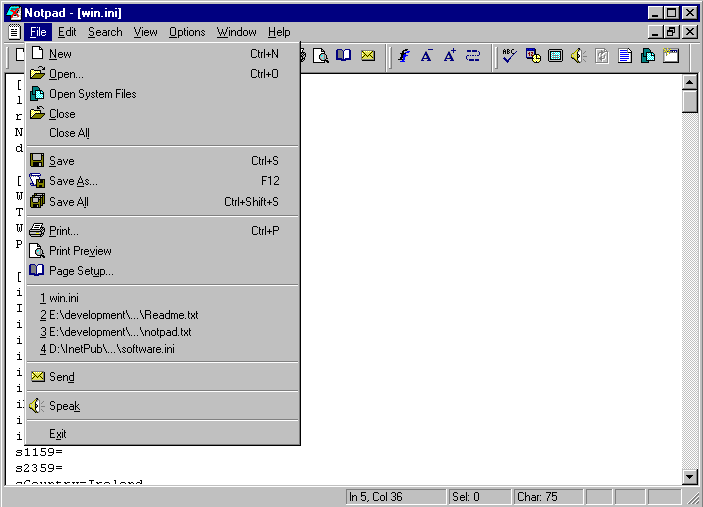
 Sample Screen Image
 Download
Instructions
Download
Instructions
- If you haven't already got the latest MFC DLL’s on your machine (MFC42.DLL
in your Windows system directory), then grab them from
http://www.naughter.com/download/vcredist.exe.
- Download the enclosed zip file. This contains
the Notpad binaries, helper applications, help file and text file describing
Notpad. The download size is just 230k so it should be pretty quick to download.
- You must have the HTML Help Run-time components installed as this is required
to view the documentation which as of v2.62 of Notpad is now in compiled HTML
format. The simplest way to accomplish this is to have Internet Explorer 4 or
later installed on your machine.
- If you do not want to sell your soul to Microsoft <g> and would rather
not be forced to install Internet Explorer to use Notpad, then as of v2.64 of
Notpad there is now a plain HTML help option. To turn this option on, use the
option 'Use plain HTML help instead of Compiled HTML' on the Advanced tab from
the menu item 'Tools -> Options'. You will also need to download the
'notpadhelp.zip' file and unzip the files
inside it into where you have Notpad installed.
- If you want to use the text to speech features of Notpad then you will also
need to download this text to speech zip file.
It's a large download (Just under 2 MB), but it's well worth it if you want
to get the best out of Notpad.
- If you want to use the spell checking features of Notpad then you will also
need to download this spell checking file.
The size is 400k.
Updates
30 September 2012
- Please note that I have not worked on this application in many years and
is considered obsolete. If you would like a good text editor application for
Windows, I would suggest you check out the web site
http://www.texteditors.info/ which
has a good breakdown on the text editors both free and commercial to choose
from.
v2.69 (31 January 2004)
- Fixed a bug where Notpad would appear unregistered when non admin users
on Windows 2000 and XP run a registered copy of Notpad.
v2.68 (22 June 2003)
- Fixed a crash when a large amount of text is selected, and you activate
speech
- Updated the links for the VC Redist to point to my own web site.
v2.67 (20 June 2003)
- A number of bug fixes after 4 years of a delay. See the help file for full
details.
v2.66 (15 July 1999)
- A few small changes. See the help file for full details.
v2.66 (15 July 1999)
- A few small changes. See the help file for full details.
v2.65 (9 June 1999)
- A few small changes. See the help file for full details.
v2.64 (17 May 1999)
- A few small changes. See the help file for full details.
v2.63 (21 April 1999)
- Loads of bug fixes and a few new items. See the help file for full details.
v2.62 (24 March 1999)
- Majorish update, Fix for a number of serious bugs in v2.61 and a new compiled
HTML based help file. See the help file for full details.
v2.61 (8 December 1998)
- Fix for a number of serious bugs in v2.6. See the help file for full details.
v2.6 (5 December 1998)
- 40 updates / bug fixes. See the help file for full details.
v2.5 (2 June 1998)
- A few new features plus numerous bug fixes. See the help file for full details.
v2.4 (9 December 1997)
- See the help file for full details about changes made since v2.3.