
 CListOptionsCtrl
v1.24 An MFC class to provide a properties browser control
(Obsolete)
CListOptionsCtrl
v1.24 An MFC class to provide a properties browser control
(Obsolete)
Welcome to CListOptionsCtrl, a control which implements a properties browser
control similar to the properties browser in Visual Basic. In addition to Boolean
values, it also allows edit boxes, combo boxes, file browser, folder browsers, color
browsers, font browsers, font name combo boxes, general opaque objects, date controls,
time controls and IP address controls to be included in the list control. Included
below is a snapshot showing the demo application and what the control looks like
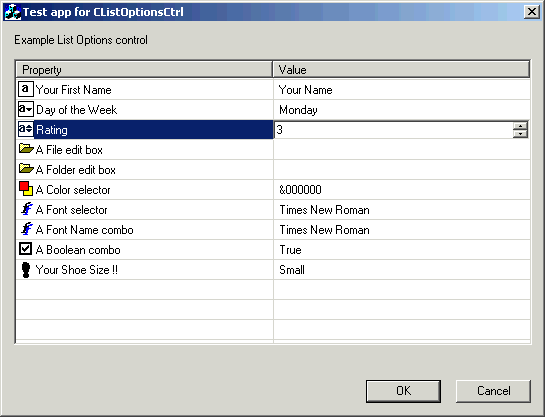
The enclosed zip file contains the CListOptionsCtrl
source code and a simple dialog based application which exercises the class.
Copyright
- You are allowed to include the source code in any product (commercial, shareware,
freeware or otherwise) when your product is released in binary form.
- You are allowed to modify the source code in any way you want except you
cannot modify the copyright details at the top of each module.
- If you want to distribute source code with your application, then you are
only allowed to distribute versions released by the author. This is to maintain
a single distribution point for the source code.
Updates
28 February 2016
- Please note that I have discontinued development of this code and it is
now considered obsolete. This is because as of Visual Studio 2008 with the MFC
Feature Pack, there is a new GUI
CMFCPropertyGridCtrl
class which implements pretty much all the functionality of CListOptionsCtrl.
I have reviewed the "NewControls" MFC sample which demonstrates CMFCPropertyGridCtrl
as well as a lot of the other Feature Pack classes. With this new class, it
is relatively easily to implement:
- The "Your First Name" sample property in my code is supported
out of the box using the in place editor support of CMFCPropertyGridCtrl
- The "Day of the Week" and "Font Name combo" sample
properties in my code are supported via the
CMFCPropertyGridProperty::AddOption
method
- The "Rating" sample property in my code is supported via the
CMFCPropertyGridProperty::EnableSpinControl
method
- The "File edit box" and "Folder edit box" properties
in my code are supported via the
CMFCPropertyGridFileProperty
class
- The "Color selector" property in my code is supported via
the CMFCPropertyGridColorProperty
class
- The "Font Selector" property in my code is supported via the
CMFCPropertyGridFontProperty
class.
- The "Boolean combo" property in my code is supported via setting
the value of a
CMFCPropertyGridProperty
property to a VT_BOOL.
- The "Your Shoe Size" property in my code is supported via
implementing a custom class derived from
CMFCPropertyGridProperty.
In the NewControls sample, this corresponds most closely to the class called "CCustomDlgProp"
- The "Your Shoe Size (Combo)" property in my code can be implementing
with a custom class derived from
CMFCPropertyGridProperty.
I was able to take the class called "CTwoButtonsProp" in the "NewControls"
sample and modify it to show the standard drop down button and "..."
edit button at the same time. The drop down button then showed the combo
box values while the edit button brought up a custom editor. This was all
achieved using just c. 50 lines of code.
- The "Date Example" and "Time Example" properties
in my code can be implemented using a custom class derived from
CMFCPropertyGridProperty.
I was able to implement both of these using just c. 80 lines of code
- The "IP address Selector" property in my code requires a bit
more code to implement than the date or time example as I needed to modify
the CMFCPropertyGridCtrl::m_nRowHeight value to avoid clipping when the
IP address in place control was drawn. To change the m_nRowHeight value
I needed to implement a class derived from CMFCPropertyGridCtrl and override
the AdjustLayout
method to increase the size of the calculated m_nRowHeight value. I also
needed to implement a class derived from
CMFCPropertyGridProperty
to provide access to the HasButton protected member variable. All told,
about 130 lines of code to support an IPv4 address control.
- The final "Your First Name" sample property in my code is
demonstrated by the ComboBoxEx property in the "NewControl" sample
- This new built in MFC control class supports a number of additional features
such as disabled properties, skinning, masked edit values, embedded slider and
ComboBoEx classes, icon lists, hierarchical data, a description bar and many
other features, which now makes my implementation obsolete.
V1.24 (16 March 2015)
- Updated copyright details.
- Updated the code to clean compile on VC 2013
V1.23 (21 May 2012)
- Updated copyright details.
- Updated the sample app to clean compile on VC 2010.
- Added support for enabling / disabling items. Thanks to Damir Valiulin for
this nice addition.
- Updated sample project settings to more modern defaults
- Code now compiles cleanly using Code Analysis (/analyze)
V1.22 (15 June 2008)
- Updated copyright details
- Code now compiles cleanly using Code Analysis (/analyze)
- Updated code to compile correctly using _ATL_CSTRING_EXPLICIT_CONSTRUCTORS
define
- The code now only supports VC 2005 or later.
- Replaced all calls to CopyMemory with memcpy
V1.21 (23 December 2007)
- Updated copyright details.
- Removed VC 6 style AppWizard comments from the code.
- Optimized CListOptionsItemData constructor code
- Boolean member variables of CListOptionsItemData have now been made "bool"
instead of "BOOL"
- Fixed an issue where if you create a combo box with a style of CBS_DROPDOWN
instead of CBS_DROPDOWNLIST, then the combo box would not be properly deactivated
when it loses focus to a control outside of the ListOptionsCtrl while the cursor
is in the combo box edit field. Thanks to Tobias Wolf for reporting this issue.
- Fixed a crash where you select a combo box item, select something in it
and then hit tab.
- Focus is now correctly transferred to a list options button if you hit tab
on a list options combo box.
V1.20 (7 July 2006)
- Code now uses newer C++ style casts instead of C style casts.
- Removed various unused constructors and destructors in the sample app's
code.
- Updated code to compile cleanly using VC 2005.
V1.19 (8 May 2006)
- Removed unnecessary message map for CListOptionsSpinCtrl WM_CHAR
- Removed unnecessary message map for CListOptionsBrowseButton WM_CHAR
- Reworked CListOptionsDateCtrl::GetDisplayText to handle variable length
data
- Reworked CListOptionsTimeCtrl::GetDisplayText to handle variable length
data
- Removed unnecessary message map for CListOptionsTimeCtrl WM_CREATE
- CListOptionsEdit::GetBrowseForFolderCaption(), CListOptionsEdit::GetBrowseForFileCaption()
and CListOptionsEdit::GetFileExtensionFilter() now use string resources instead
of string literals.
V1.18 (3 May 2006)
- Updated the copyright details.
- Control now allows the per item text to be Bold, italic or underlined or
any combination of the three.
- Optimized the construction of member variables in all classes
- Inlined the virtual destructors.
- Provided a set of macros which allow the code to be easily added to an extension
DLL.
- Control now uses WM_USER instead of WM_APP for private messages
- Prompt and value text color and background color can also be customized.
- Updated documentation to use the same style as the web site.
- Did a spell check of the documentation.
V1.17 (26 November 2004)
- Fixed a bug where in place editing would fail on a multiple monitor setup
when the listoptions control was on a monitor which had negative coordinates
relative to the primary display
V1.16 (5 May 2004)
- Fixed some compiler warnings when the code is compiled using VC 7.x. Please
note that to implement these fixes, the code will now require the Platform SDK
to be installed if you compile the code on VC 6.
V1.15 (17 October 2002)
- Changed function "BrowserForOpaque" to "BrowseForOpaque"
V1.14 (2 June 2002)
- Now fully supports the CIPAddressCtrl for editing of IP addresses.
V1.13 (1 June 2002)
- Moved application and code to VC 6 to allow item 2 below.
- Now fully supports the CDateTimeCtrl for editing of dates and times
V1.12 (31 May 2002)
- Color is now optionally drawn in the icon for color browser items
V1.11 (23 January 2002)
- Improved the "Opaque Browser" support to allow the two runtime
classes to be specified e.g. you can have a combo box in addition to a button.
V1.1 (13 January 2002)
- Made _ListOptionsItemData structure globally available and renamed it to
CListOptionsItemData.
- Each child control class now is initialized with the index of the list view
control at which it is created. This allows added flexibility in what a child
control can do.
- Added a method to add an "Opaque Browser" to the list options
control. An Opaque Browser is where the list options control allows a end user
specified structure to be edited by the list options control without it explicitly
knowing what it is editing. A standard "..." browse button is used
and virtual functions are used to allow end user code to implement the required "browsing"
functionality at the right time.
- Added a WM_SIZE handler to allow the class to work correctly where the containing
view or dialog resizes it for layout reasons.
- Fixed a problem in CListOptionsCtrl::OnKillFocus which was not checking
the value of GetSelectedItem before using it
- Updated copyright messages in code and in documentation
V1.0 (5 December 2001)