
 DynIP
v1.22 A IP Poster for people with dynamic IP addresses
(Obsolete)
DynIP
v1.22 A IP Poster for people with dynamic IP addresses
(Obsolete)
.gif) A
ZDNet 4 star Award Winner
A
ZDNet 4 star Award Winner
DynIP is a simple little application to allow you to post your dynamic IP address
up to your web site. This is the case for most internet users who connect to the
internet through an ISP which assigns them a different IP address each time they
connect.
Making the IP address of your machine widely available, allows other people on
the internet to connect to your machine as if your machine was like any other permanent
site on the internet. This allows people on the Internet to connect to your web
and FTP server running on your local machine. It is also useful for people who are
running simple internet chat programs which do not use a permanent Internet server
for registration.
You should be aware that by making your IP address public, leaves your machine
open to the same security risks normal internet sites have to cope with, so make
sure you are aware of the security issues first.
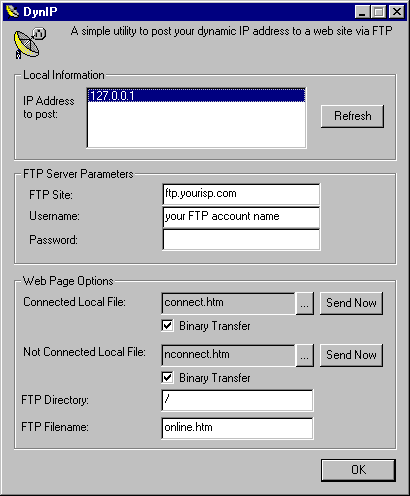
When run the DynIP application presents the following dialog:
Download Instructions
- If you haven't already got the MFC DLL’s on your machine (MFC42.DLL
in your Windows system directory), then grab them from
http://www.naughter.com/download/vcredist.exe.
- You must have the Microsoft wininet.dll properly installed. This will be
the case if you have Internet Explorer 3 or 4 installed. This DLL is a high
level interface to the FTP, HTTP and gopher protocols and is used by Internet
Explorer itself for these protocols. Note: This program has not been tested
with any Netscape browser and may not work in this environment.
- Download the enclosed zip file. This contains
the DynIP binaries, html files and documentation.
Updates
21 June 2008
- Please note that this code is now obsolete as IMHO there are much more refined
ways of achieving what DynIP was originally designed for. For example check
out Dynamic DNS from
DynDNS. Alternatively a lot of broadband routers these days have Dynamic DNS
functionality built in. For example my Linksys RV042 router supports services
from www.dyndns.org amongst others.
V1.22 (10 November 1998)
- Values are now stored in an ini file instead of the registry.
- The ini file to use can be modified via the command line. To use a new ini
file to load and store its settings use Dynip.exe "/ini:ini filename".
e.g. to use the c:\dynip.ini file to load and store settings you can use the
command line Dynip.exe /ini:c:\dynip.exe. This allows you to have multiple configurations
for DynIP if you want to post your online page to multiple web sites.
V1.21 (7 May 1998)
- Fixed a bug in the code which was causing the program to fail when returning
the 2nd or greater IP address on a multihoned device.
V1.2 (4 February 1998)
- Now supports choice of ftp binary or ascii transfer.
- Now supports command line automation. To send the connected page using the
command line without bringing up the DynIP dialog use the following command
line "DynIP.exe /connect". To send the not connected page use the
command line "DynIP.exe /disconnect". If you are on a multihoned machine
then you can specify what IP address to send using the command line /addressX
where X is the nth index (0 based) of the IP address to send. This
corresponds to the position of the IP address you want to send in the list box
on the DynIP dialog. e.g. to send the connected page containing the 2nd IP address
of your machine, use the command line "DynIP.exe /connect /address1".
V1.11 (10 November 1997)
- Now returns more verbose error messages for some Internet errors.
V1.1 (28 October 1997)
- DynIP now supports multihomed hosts.
- A refresh button to allow the IP address(s) to be retrieved immediately
has been added.