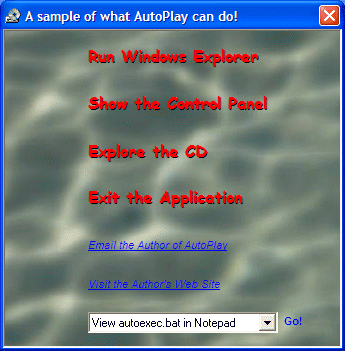
Welcome to AutoPlay, A shareware application to use with your autorun.inf enabled
CD's. As an example have a look at the screen shop below which shows what the demo
in this distribution looks like:
Features
- Configurable background bitmap, including complete 256, hi-color, true-color
and full palette support.
- Start up and shut down sounds
- Will work on 95, 98, NT, 2000, XP and 2003 without any service pack or 3rd
party DLL requirements.
- Supports "Hot look" buttons with hyperlink cursor.
- Flyby sounds for each button.
- Supports mailto, ftp and http URLs as well as standard absolute and relative
file links.
- A Complete WYSIWYG editor to allow creation of a single executable which
you can ship without the need for any external files.
The enclosed zip file contains the AutoPlay
executables, sample files and documentation for the program.
Updates
2 July 2017
- Please note that I have not worked on this application in many years and
is considered obsolete. If you would like a good application to create
AutoRun type applications, I would suggest you check out the list of free
programs at
http://www.ezau.com/latest/articles/083.shtml or something like
MenuBox if you want to go with some
commercial software.
v1.33 (1 February 2006)
- Updated the documentation to use the same style as the web site.
- Reviewed all the documentation for correctness.
- AutoPlay Studio now uses v1.67 of my CTreeOptionsCtrl class.
- Now uses v1.22 of my CIJLBitmap class.
- Fixed a bug where the Highlight DeltaY value could not be configured for
a button.
- Addition of the following new button attributes: right, bottom, UseBackgroundColor,
BackgroundColor, UseHighlightBackgroundColor, HighlightBackgroundColor, BackgroundCornerSize,
BackgroundEdgeColor, TextDeltaX and TextDeltaY. Thanks to Regis Betsch for prompting
this update.
- Minor update to the shipped sample to demonstrate more of the new features
of this release.
- AutoPlay Studio now provides a link to this help file via the usual methods.
v1.32 (5 October 2003)
- AutoPlay now provides support for a "ShellExecute and Exit App"
type button
4 February 2003
- A Unicode version of AutoPlay is now available if you are a registered user.
No new functionality has been added, but the Unicode version just makes production
of internationalised AutoRun CDs more easier.
V1.31 (20 December 2002)
- Buttons now support an additional attribute called "Close App When
Clicked". Thanks to Pete McBraida for this suggestion.
- AutoPlay Studio now supports drag and drag of scripts from the shell.
- AutoPlay Studio now supports automated builds of the executable. This is
achieved using two new command lines. "/make" will instruct it to
build the resultant exe and an optional "/output:filename" which allows
you to override the output executable path. e.g. using the command line: APStudio.exe
/make "/output:c:\temp\PJ.exe" "c:\temp\Untitled.ini" will
load up the script "c:\temp\untitled.ini" and build the exe to "c:\temp\pj.exe".
Thanks to Pham Hai for this suggestion.
- Produced a better help message when Autoplay.exe is run and it cannot find
the payload which is produced when you "Make Exe" in AutoPlay Studio.
- Fixed the file extension filter for icon attributes in AutoPlay Studio.
- "Make Exe" Dialog in AutoPlay studio now includes a "Make
AUTORUN.INF" option.
- AutoPlay Studio now supports automated creation of autorun.inf files. This
is achieved using a new "/makeinf" command line. e.g. using the command
line APStudio.exe /makeinf "/output:c:\temp\pj.exe" "c:\temp\untitled.ini"
will produce a "c:\temp\AUTORUN.INF" file to match the contents of
the script. This streamlines the creation of builds quite a lot when you are
integrating it into a build procedure!.
- "Make Exe" option in AutoPlay Studio now includes an Accelerator,
namely Ctrl+M.
V1.30 (18 October 2002)
- Major update to AutoPlay to include an "AutoPlay Studio" application
which allows for WYSIWYG design of AutoPlay applications.
- AutoPlay applications are now fully contained in one executable (Use the
menu item File -> Make Exe). This makes it easier for you to distribute on
your CD's.
- Fixed a bug with the loading of DropShadowDeltaY and HighlightDeltaY values
for a button.
- AutoPlay is now built with Visual C++ v6.
- Unregistered versions of AutoPlay applications display a reminder message
about registering when the application is closed.
V1.2 (11 February 2001)
- Image to be loaded can now be a jpeg or gif in addition to the usual Windows
bmp file. Please note that to release code which uses the GIF format, you will
need to obtain a license from Unisys.
- If an ini file cannot be found, then the app aborts rather than displaying
anything.
- The name of the ini file can now be overridden by the command line to AutoPlay.
e.g. Autoplay.exe bla.ini
- Now fully supports a Exe, Directory and Verb commands. This allows complete
control over the ShellExecute call to bring up your desired app. For more info
check out the sample autoplay.ini file shipped with the code.
- Please note that the Alpha version in the distribution has not been updated.
- Updated sample app to demonstrate the Exe, Directory and Verb commands.
10 February 2001
- Updated links in the sample autoplay application to point to my new web
site and email address.
V1.11 (11 September 2000)
- Fixed a problem where the device context was not being restored correctly
in the method CTrackingButton::DrawItem.
V1.1 (8 May 2000)
- Now supports combo boxes in addition to buttons.
20 June 1999
- A compiled version of AutoPlay for the NT running on an Alpha CPU is now
provided in the alpha directory in the AutoPlay zip file. Thanks to Rich Peters
for producing and testing this (since I don't have a DEC Alpha lying around <g>).
V1.0 (14 June 1999)
 AutoPlay v1.33 (Obsolete)